
Architecture
Legacy email infrastructure
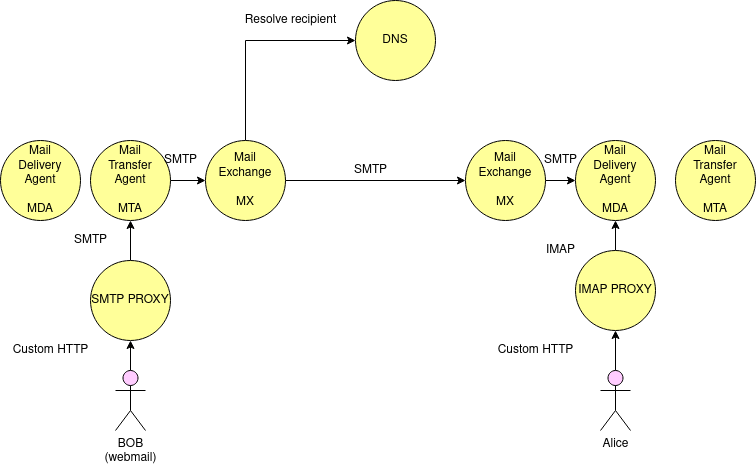
A legacy mail infrastructure is composed of…
- A Mail Transfer agent, that users uses to submit new emails with SMTP. A proxy is needed as brozser cannot do SMTP.
- A Mail exchange server does a DNS lookup to locate remote MX server and sends the email to it
- The email arrives on the Mail Delivery Agent that a user can access to read his mail via IMAP. A proxy is needed here too.
JMAP infrastructure
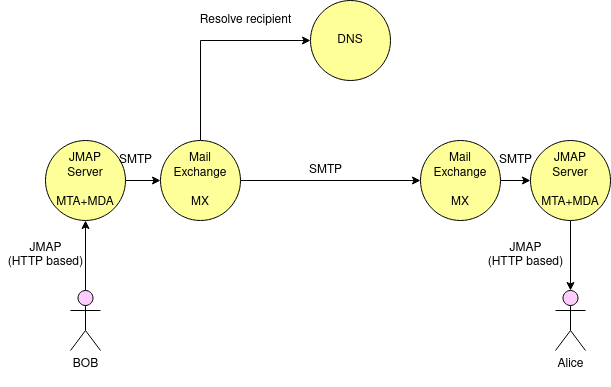
JMAP is a new protocol unifying MTA and MDA responsibilities. HTTP and JSON based, stateless, the user webmail can directly communicate with the mail server.
Application context
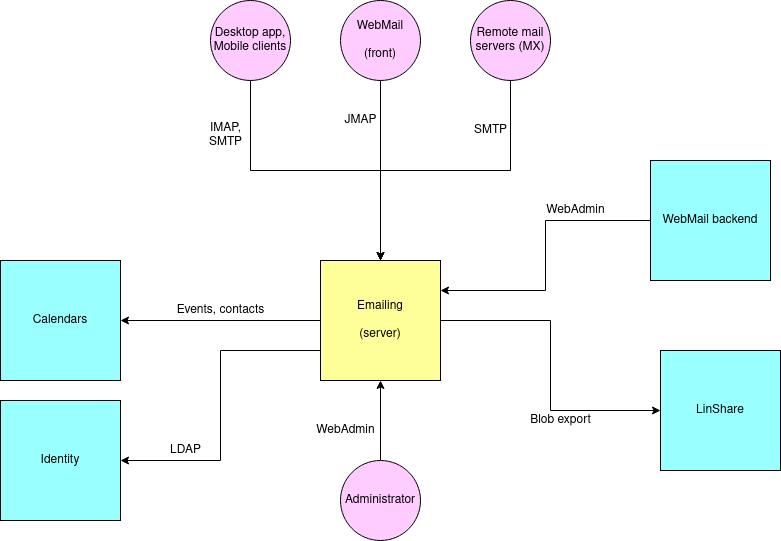
Here are the interactions happening with the email server system:
- Remote site MX servers sends new Emails
- The INBOX WebMail communicates via JMAP
- Desktop applications and mobile applications communicates via IMAP and SMTP
- WebMail INBOX backend can perform some webadmin calls for administration porposes as well as some features (eg: redirections)
- Events and contacts are extracted for the calendar application
- Some content (mailbox export) can be performed to LinShare
- A LDAP server is used for identity
Software components
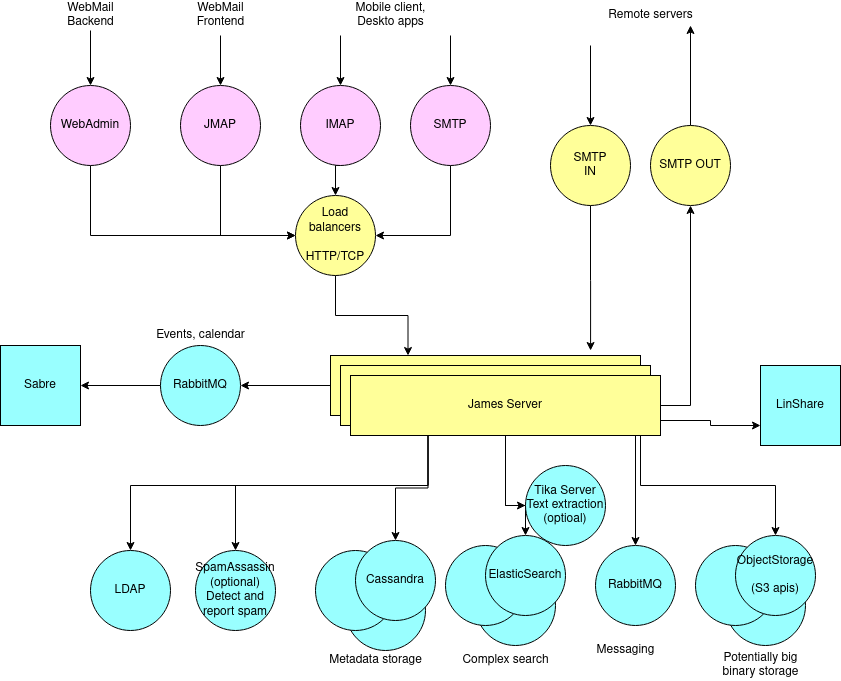
James lies at the heart of our infrastructure both as a MTA and MDA. HTTP load balancing can be set up for JMAP and webadmin (stateless), however statefull protocols like SMTP and IMAP requires TCP session load balancing.
We rely on two postfix (in & out) as an MX because James mailqueue elacks required capabilities namely delays.
Regarding databases:
- LDAP allows identity management
- Cassandra stores metadata
- ElasticSearch manages complex text search at scale
- ObjectStorage (S3 APIs) stores potentially large binary data
- RabbitMQ ensures:
- Messaging between James nodes, mostly related to notifications
- WorkQueues patterns for fault tolerance and load balancing
Optional dependencies includes:
- SpamAssassin for spam detection and reporting
- Tika Server for extracting attachment content prior ElasticSearch indexing>
Transfer of events and contacts to Sabre (calendar) is done through a RabbitMQ exchange.
Calls to LinShare are done through the APIs
James Components
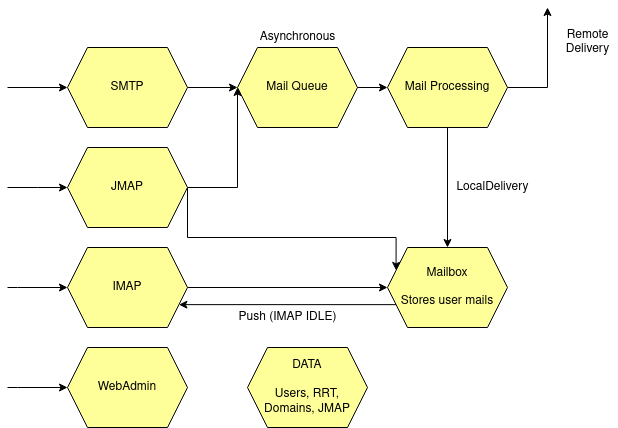
James leverages protocol stacks: IMAP, JMAP, SMTP, WebAdmin.
The MailQueue ensures an asynchronous processing of submitted emails and sits between email submission ie via SMTP.
The Mailbox stores users email and folders. It is accessed via MDA protocols like IMAP or JMAP.
MailProcessing logic is fully configurable based on standard components.
Extending James behaviour
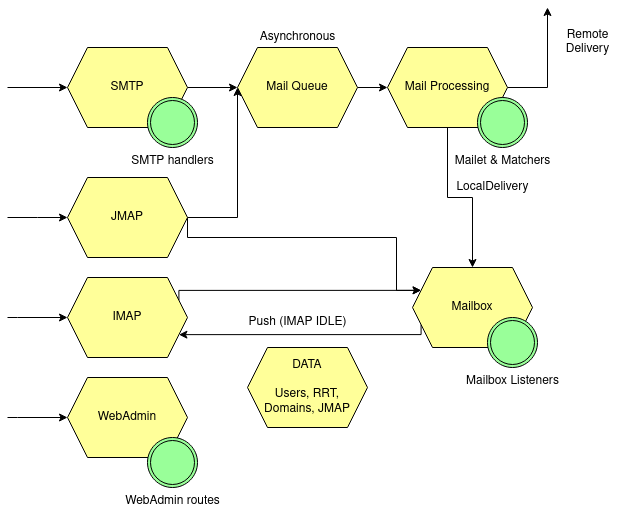
Several extension mechanisms exists enables to extend James server without recompiling the all source code:
- Mailet and matchers allows customizing email processing (pre delivery)
- MailboxListeners enables to hook on the events within the mailbox
- SMTP hooks enables to extend SMTP capabilities
- WebAdmin can be enriched with new HTTP routes
Component details
Mailbox component
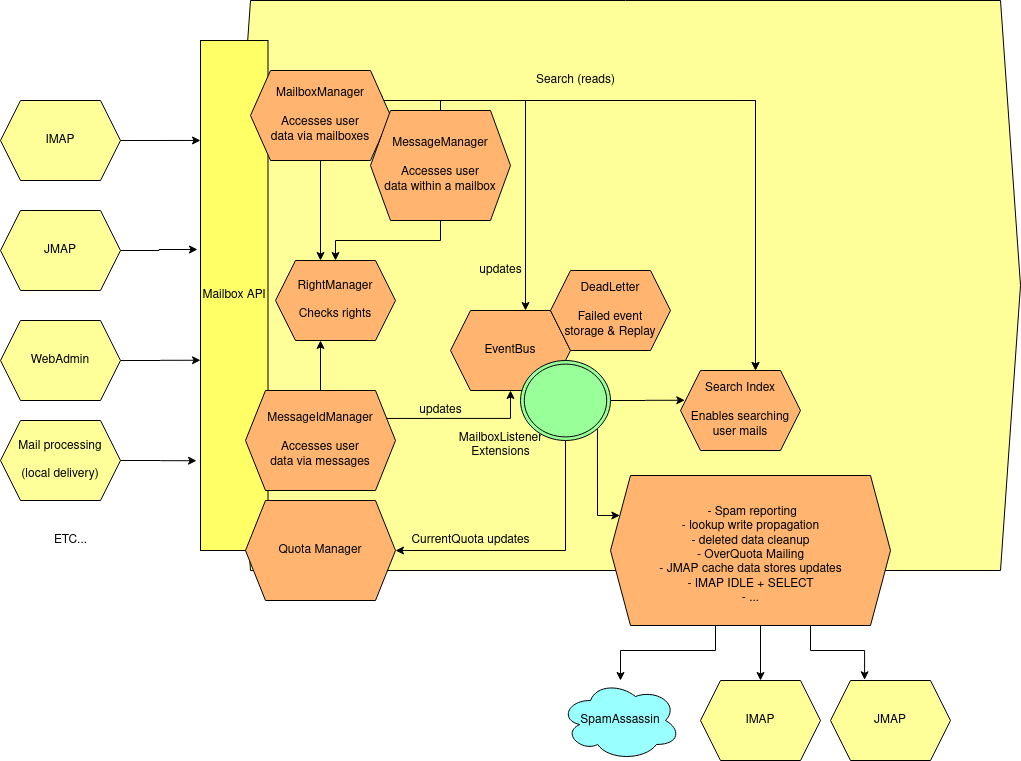
The various components interacts with the mailbox through the mailbox-api.
- The Mailbox manager enables interactions with the folders
- The Message manager entity allows interactions with the messages within a folder.
- The message id manager enables to interact directly with messages
- The Quota manager allow reading quota information for users
These components ensures the operation matches the access rights by checking the quota manager, as well as quota policy.
All events are fired on the eventBus, which then triggers notifications, and extra functionalities listed on the diagram. Errors are retried and when a trheshold is crossed, events are stored on dead-letter for admin diagnostic as well as later replay.
Search is conducted by ElasticSearch, data is asynchronously indexed via the eventBus.
Mail processing component
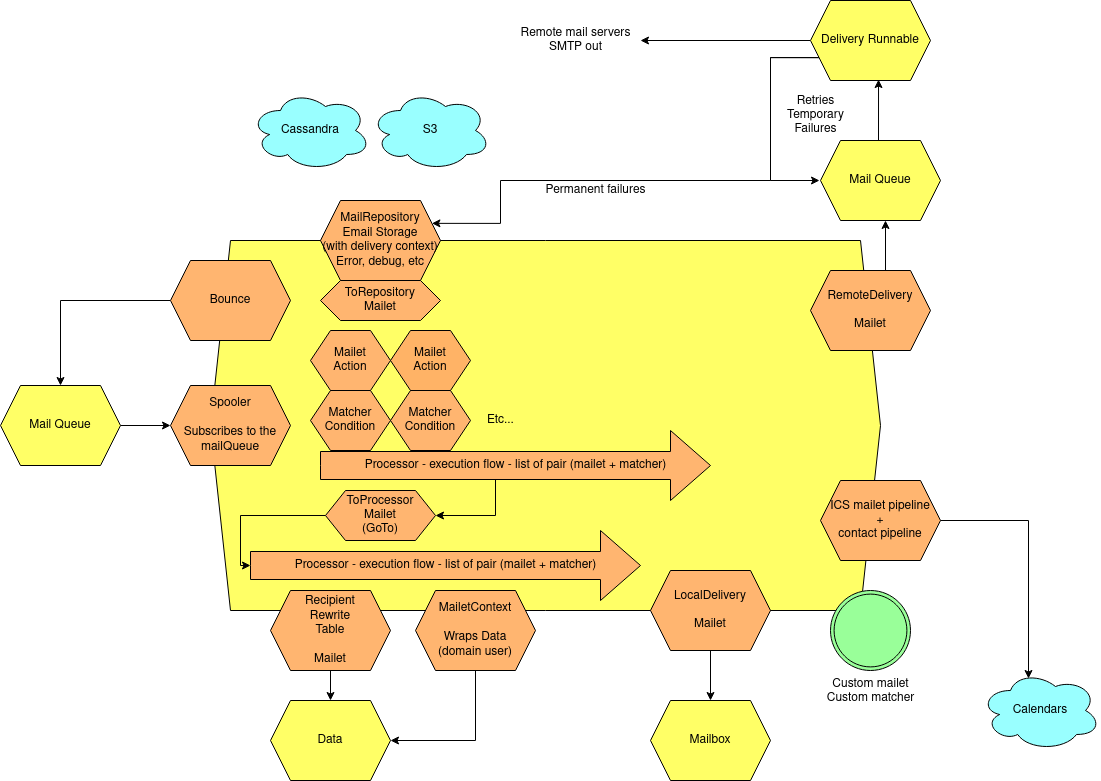
Mail processing allows to take asynchronously business decisions on received emails.
Here are its components:
- The
spoolertakes mail out of the mailQueue and executes mail processing within themailet container. - The
mailet containersynchronously executes the user defined logic. Thislogic' is written through the use ofmailet,matcherandprocessor`. - A
mailetrepresents an action: mail modification, envelop modification, a side effect, or stop processing. - A
matcherrepresents a condition to execute a mailet. - A
processoris a flow of pair ofmatcherandmailetexecuted sequentially. TheToProcessormailet is agotoinstruction to start executing anotherprocessor - A
mail repositoryallows storage of a mail as part of its processing. Standard configuration relies on the following mail repository: **cassandra://var/mail/error/: unexpected errors that occurred during mail processing. Emails impacted by performance related exceptions, or logical bug within James code are typically stored here. These mails could be reprocessed once the cause of the error is fixed. TheMail.errorfield can help diagnose the issue. Correlation with logs can be achieved via the use of theMail.namefield. **cassandra://var/mail/address-error/: mail addressed to a non-existing recipient of a handled local domain. These mails could be reprocessed once the user is created, for instance. **cassandra://var/mail/relay-denied/: mail for whom relay was denied: missing authentication can, for instance, be a cause. In addition to prevent disasters upon miss configuration, an email review of this mail repository can help refine a host spammer blacklist. **cassandra://var/mail/rrt-error/: runtime error upon Recipient Rewritting occurred. This is typically due to a loop.
This diagram presents a few mailets interacting with core components:
- LocalDelivery stores mail in local mailboxes
- Remote delivery transmit mails to remote servers., emails are enqueued by domain for an asynchrounous treatment by DeliveryRunnable, wich after several retries will give up and store the mail in a MailRepository.
- RecipientRewriteTables applies envelope rewriting rules (alias, forwards, groups, etc…)
- Calendar and contact pipelines oupouts data to Sabre via RabbitMQ
- ToProcessor allows switching of processor
- ToRepository stores the mail into a given MailRepository
MailQueue component
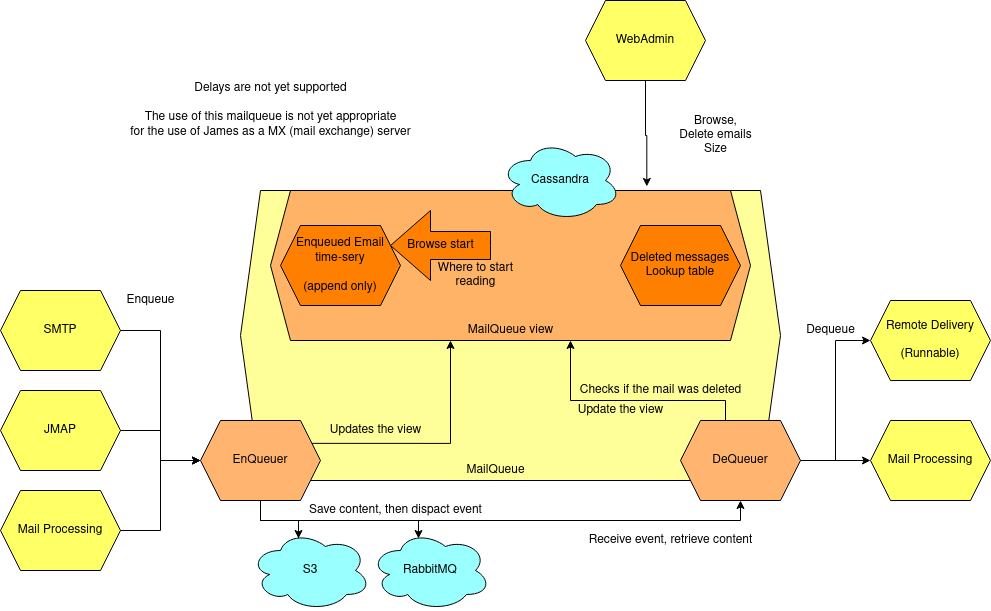
An email queue is a mandatory component of SMTP servers. It is a system that creates a queue of emails that are waiting to be processed for delivery. Email queuing is a form of Message Queuing – an asynchronous service-to-service communication. A message queue is meant to decouple a producing process from a consuming one. An email queue decouples email reception from email processing. It allows them to communicate without being connected. As such, the queued emails wait for processing until the recipient is available to receive them. As James is an Email Server, it also supports mail queue as well.
Why Mail Queue is necessary
You might often need to check mail queue to make sure all emails are delivered properly. At first, you need to know why email queues get clogged. Here are the two core reasons for that:
- Exceeded volume of emails
Some mailbox providers enforce email rate limits on IP addresses. The limits are based on the sender reputation. If you exceeded this rate and queued too many emails, the delivery speed will decrease.
- Spam-related issues
Another common reason is that your email has been busted by spam filters. The filters will let the emails gradually pass to analyze how the rest of the recipients react to the message. If there is slow progress, it’s okay. Your email campaign is being observed and assessed. If it’s stuck, there could be different reasons including the blockage of your IP address.
Why combining Cassandra, RabbitMQ and Object storage for MailQueue
- RabbitMQ ensures the messaging function, and avoids polling.
- Cassandra enables administrative operations such as browsing, deleting using a time series which might require fine performance tuning (see http://cassandra.apache.org/doc/latest/operating/index.html[Operating Casandra documentation]).
- Object Storage stores potentially large binary payload.
Enqueues
Upon enqueue the payload is saved to the objectStorage, metadata saved in the mail queue view, then fired in RabbitMQ.
Upon dequeue, when a rabbitMQ event arrives, the payload is retrieved from the object store, then the view checked to see if it had been deleted.
The view is composed of a read only time serie, with deletions stored into a separated table. It enables reading and deleting queue content. A pointer, the browse start, enables to skip most deleted data of the time serie. Browse start is probabilistically updated upon dequeue and deletes.
Monitoring
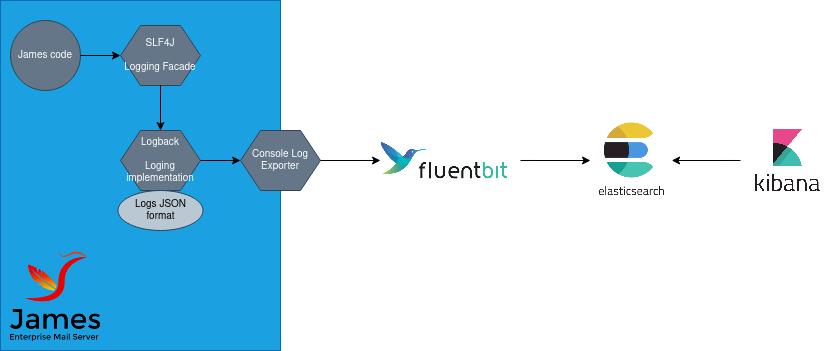
James logs at a JSON format to its standard output and fluentbit forwards logs to an ElasticSearch server, for a later display in Kibana.
James logs includes structured information (eg user, ip, session ids, etc…)
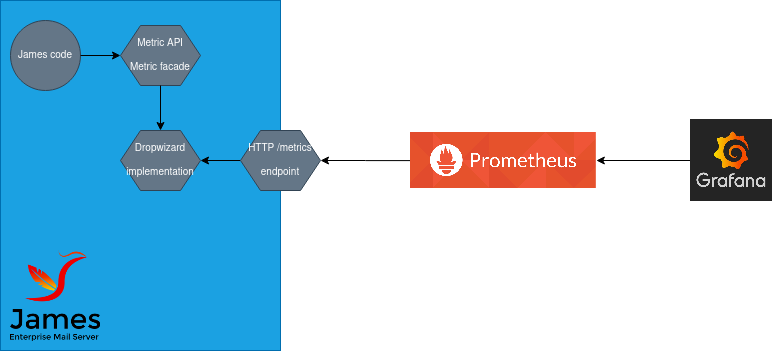
JAMES outputs its metrics directly in ElasticSearch for a later display in Grafana.
Upcoming work will let James expose its metics over HTTP for a later collect via Prometheus and a display in Grafana (WIP).
We also have set up for the Glowroot APM.
BlobStore
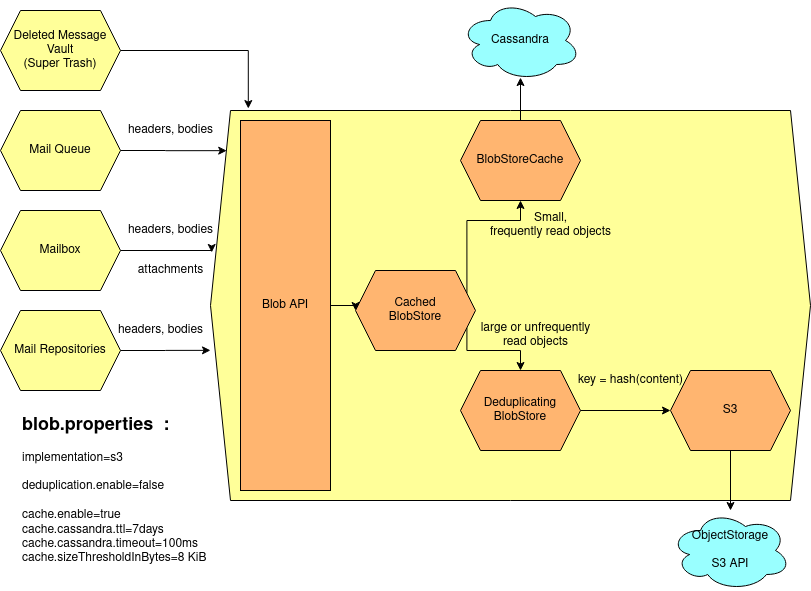
We rely on the blob store to store our binary data.
This includes:
- Mail headers: likely small, frequently read
- Mail bodies: potentially big, infrequently read
- Mail attachments: potentially big, unfrequently read
Our blob storage relies on the following technologies:
- ObjectStorage (S3 APIs): cheap, but have long access times, is good at storing unfrequently read data. All blobs are stored in the object store.
- Cassandra: expensive, but low latencies. Good at serving frequently accessed small data. We leverage a cache on top of Cassandra to fasten header blob access. This cache have an eviction time of 7 days (default) and accept only entries below 8KB default. Total cache size on openpaas.linagora.com is 1.5GB shared equally between our 3 Cassandra servers (so 500MB each).